








Compliance Language Check
Works Where You Already Work
Bias Detection & Removal
PII Redaction
Document Routing & Review
Co-authoring & Version Control
Domain-Specific Writing Presets
Compliance Language Check
Government agencies face serious risk when documents contain language that doesn’t meet legal or regulatory standards. Prooflex AI analyzes writing in real time, flagging problematic phrasing and suggesting compliant alternatives.

Prooflex Compliance Language Check Capabilities
- Real-Time Compliance Flagging — Instantly identifies vague commitments, unauthorized guarantees, or terminology inconsistent with governing statutes as users write.
- Suggested Compliant Alternatives — Pre-approved replacement language drawn from your agency’s policy library and applicable regulations.
- Style Guide Enforcement — Enforce consistent terminology and approved language across departments via administrator-uploaded agency guides.
- Regulatory Vocabulary Management — Maintain a dynamic library of approved and flagged terms synced to current statutes and policies.
- Compliance Audit Trail — Every flagged item and accepted suggestion is logged with user, timestamp, and document reference.
Works Where You Already Work
Adopting new software in a government environment is challenging. Prooflex removes that barrier entirely by delivering all its capabilities as a plug-in inside Microsoft Word and Microsoft Outlook — tools your staff already use every day.

Prooflex Microsoft Integration Capabilities
- Microsoft Word Plug-in — A sidebar directly inside Word provides real-time compliance checks, bias detection, PII flagging, and style suggestions as staff draft documents.
- Microsoft Outlook Plug-in — The same compliance and bias checks apply to email, ensuring routine agency correspondence meets communication standards.
- Inline AI Suggestions — Suggestions appear as tracked changes or inline comments, easy to accept, reject, or defer.
- No New Platform to Learn — Zero workflow disruption, no IT change management headaches, no separate login or application to manage.
- Centralized Policy Updates — Administrators update style guides and compliance rules centrally; changes propagate to all users instantly.
Bias Detection & Removal
Biased language in government documents — even unintentional — can undermine public trust, trigger civil rights complaints, and cause disparate outcomes. Prooflex helps teams write with fairness and equity by automatically detecting and flagging problematic language.

Prooflex Bias Detection Capabilities
- Disparate Impact Language Flagging — Identifies phrasing that could reflect differential treatment based on race, gender, age, disability, or other protected characteristics.
- Equity Language Suggestions — Offers neutral, person-first, and equity-aligned alternatives informed by current best practices in government communications.
- Tone Analysis — Assesses whether document tone is appropriate for the audience and context, flagging language that may read as punitive or dismissive.
- Custom Bias Lexicon — Administrators can add agency-specific terms to the flagging library to reflect local equity commitments and policy language.
- Training Integration — Flagging explanations serve as in-context learning moments, helping staff understand why language was flagged.
PII Redaction
Government agencies handle some of the most sensitive personal information in existence. Prooflex makes it fast and safe to share documents by automatically identifying and redacting personally identifiable information.

Prooflex PII Redaction Capabilities
- Automated PII Detection — Scans for names, addresses, dates of birth, Social Security numbers, case numbers, phone numbers, email addresses, and other identifiers.
- Audience-Based Redaction Profiles — Create and save redaction profiles for different recipient types — “external legal counsel,” “public records request,” or “inter-agency transfer.”
- Batch Document Redaction — Process entire folders of documents at once, applying the appropriate redaction profile to each file type automatically.
- Redaction Audit Log — Every redaction action is logged with user, timestamp, document name, and redaction profile applied for compliance reporting.
- Reversible Redaction Workflow — Original content is preserved in a secured archive; authorized users can access the unredacted source when legally required.
Document Routing & Review
Government documents often require input from multiple people across different roles. Prooflex replaces informal email chains with a structured routing system that gives every stakeholder a clear role, timeline, and complete record.

Prooflex Document Routing Capabilities
- Configurable Approval Workflows — Build sequential or parallel approval chains with conditional routing based on document type, program area, or risk level.
- Role-Based Access: Writer, Reviewer, Approver — Clear permissions ensure no one can bypass the process; each role has defined actions and visibility.
- Full Audit Trail — Every submission, comment, approval, and rejection is timestamped and tied to a named user — defensible documentation for audits.
- Deadline Tracking & Escalation — Automated reminders escalate overdue items to supervisors, preventing bottlenecks.
- Status Visibility — Writers see exactly where their document is in the routing chain at all times, with no need to chase reviewers by email.
Co-authoring & Version Control
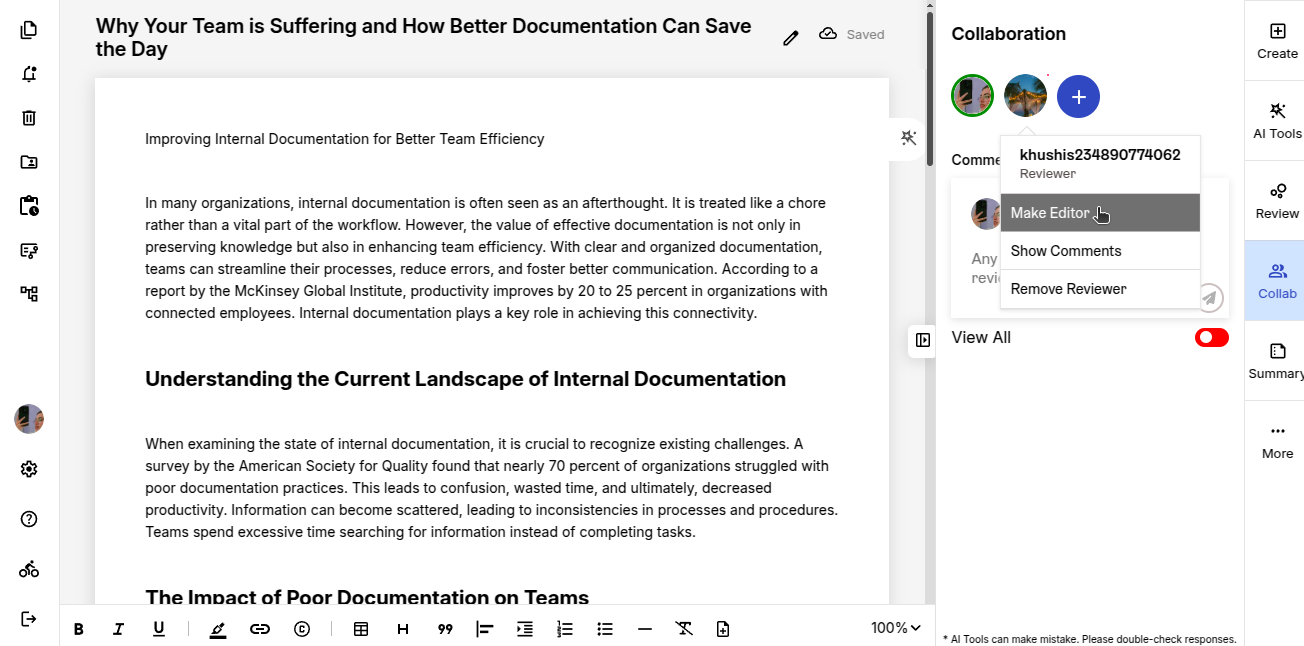
Government documents are rarely written by one person. Prooflex enables true real-time collaboration with full version history, so teams can work together without overwriting each other’s work or losing track of what changed.
Prooflex Co-authoring Capabilities
- Real-Time Collaborative Editing — Multiple team members can edit simultaneously inside Microsoft Word, with each user’s contributions color-coded.
- Automatic Version History — Every saved version is stored with a timestamp and user name; supervisors can browse and restore any prior version.
- Conflict-Free Editing — Prooflex prevents overwrite conflicts by locking sections being actively edited by another user.
- Comment & Annotation Threads — Reviewers leave in-document comments tied to specific passages; writers respond and resolve without leaving Word.
- Cross-Shift Continuity — Case workers on different shifts always pick up the most current, complete version — no emailed attachments or shared drive confusion.
Domain-Specific Writing Presets
Every government program area has its own vocabulary, terminology conventions, and writing standards. Prooflex Domain-Specific Writing Presets let agencies pre-load those standards so staff write correctly for their context from day one.

Prooflex Domain Writing Preset Capabilities
- Pre-Built Government Presets — Ready-to-use presets for social services, law enforcement, public health, permitting, and other common SLED program areas.
- Custom Agency Presets — Administrators build and publish agency-specific presets that encode local terminology, approved phrase lists, and document structure requirements.
- Role-Based Preset Assignment — Assign presets by user role so a caseworker automatically gets social services language while a grants writer gets grant-specific standards.
- Preset Version Control — Update presets centrally and all staff get the new standards immediately, without retraining or manual distribution.
- Cross-Preset Conflict Detection — When a document spans multiple program areas, Prooflex identifies and flags terminology conflicts between active presets.
Compliance Language Check
Government agencies face serious risk when documents contain language that doesn't meet legal or regulatory standards. Prooflex AI analyzes writing in real time, flagging problematic phrasing and suggesting compliant alternatives.
Prooflex Compliance Language Check Capabilities
- Real-Time Compliance Flagging — Instantly identifies vague commitments, unauthorized guarantees, or terminology inconsistent with governing statutes as users write.
- Suggested Compliant Alternatives — Pre-approved replacement language drawn from your agency's policy library and applicable regulations.
- Style Guide Enforcement — Enforce consistent terminology and approved language across departments via administrator-uploaded agency guides.
- Regulatory Vocabulary Management — Maintain a dynamic library of approved and flagged terms synced to current statutes and policies.
- Compliance Audit Trail — Every flagged item and accepted suggestion is logged with user, timestamp, and document reference.
Works Where You Already Work
Adopting new software in a government environment is challenging. Prooflex removes that barrier entirely by delivering all its capabilities as a plug-in inside Microsoft Word and Microsoft Outlook — tools your staff already use every day.
Prooflex Microsoft Integration Capabilities
- Microsoft Word Plug-in — A sidebar directly inside Word provides real-time compliance checks, bias detection, PII flagging, and style suggestions as staff draft documents.
- Microsoft Outlook Plug-in — The same compliance and bias checks apply to email, ensuring routine agency correspondence meets communication standards.
- Inline AI Suggestions — Suggestions appear as tracked changes or inline comments, easy to accept, reject, or defer.
- No New Platform to Learn — Zero workflow disruption, no IT change management headaches, no separate login or application to manage.
- Centralized Policy Updates — Administrators update style guides and compliance rules centrally; changes propagate to all users instantly.
Bias Detection & Removal
Biased language in government documents — even unintentional — can undermine public trust, trigger civil rights complaints, and cause disparate outcomes. Prooflex helps teams write with fairness and equity by automatically detecting and flagging problematic language.
Prooflex Bias Detection Capabilities
- Disparate Impact Language Flagging — Identifies phrasing that could reflect differential treatment based on race, gender, age, disability, or other protected characteristics.
- Equity Language Suggestions — Offers neutral, person-first, and equity-aligned alternatives informed by current best practices in government communications.
- Tone Analysis — Assesses whether document tone is appropriate for the audience and context, flagging language that may read as punitive or dismissive.
- Custom Bias Lexicon — Administrators can add agency-specific terms to the flagging library to reflect local equity commitments and policy language.
- Training Integration — Flagging explanations serve as in-context learning moments, helping staff understand why language was flagged.
PII Redaction
Government agencies handle some of the most sensitive personal information in existence. Prooflex makes it fast and safe to share documents by automatically identifying and redacting personally identifiable information.
Prooflex PII Redaction Capabilities
- Automated PII Detection — Scans for names, addresses, dates of birth, Social Security numbers, case numbers, phone numbers, email addresses, and other identifiers.
- Audience-Based Redaction Profiles — Create and save redaction profiles for different recipient types — "external legal counsel," "public records request," or "inter-agency transfer."
- Batch Document Redaction — Process entire folders of documents at once, applying the appropriate redaction profile to each file type automatically.
- Redaction Audit Log — Every redaction action is logged with user, timestamp, document name, and redaction profile applied for compliance reporting.
- Reversible Redaction Workflow — Original content is preserved in a secured archive; authorized users can access the unredacted source when legally required.
Document Routing & Review
Government documents often require input from multiple people across different roles. Prooflex replaces informal email chains with a structured routing system that gives every stakeholder a clear role, timeline, and complete record.
Prooflex Document Routing Capabilities
- Configurable Approval Workflows — Build sequential or parallel approval chains with conditional routing based on document type, program area, or risk level.
- Role-Based Access: Writer, Reviewer, Approver — Clear permissions ensure no one can bypass the process; each role has defined actions and visibility.
- Full Audit Trail — Every submission, comment, approval, and rejection is timestamped and tied to a named user — defensible documentation for audits.
- Deadline Tracking & Escalation — Automated reminders escalate overdue items to supervisors, preventing bottlenecks.
- Status Visibility — Writers see exactly where their document is in the routing chain at all times, with no need to chase reviewers by email.
Co-authoring & Version Control
Government documents are rarely written by one person. Prooflex enables true real-time collaboration with full version history, so teams can work together without overwriting each other's work or losing track of what changed.
Prooflex Co-authoring Capabilities
- Real-Time Collaborative Editing — Multiple team members can edit simultaneously inside Microsoft Word, with each user's contributions color-coded.
- Automatic Version History — Every saved version is stored with a timestamp and user name; supervisors can browse and restore any prior version.
- Conflict-Free Editing — Prooflex prevents overwrite conflicts by locking sections being actively edited by another user.
- Comment & Annotation Threads — Reviewers leave in-document comments tied to specific passages; writers respond and resolve without leaving Word.
- Cross-Shift Continuity — Case workers on different shifts always pick up the most current, complete version — no emailed attachments or shared drive confusion.
Domain-Specific Writing Presets
Every government program area has its own vocabulary, terminology conventions, and writing standards. Prooflex Domain-Specific Writing Presets let agencies pre-load those standards so staff write correctly for their context from day one.
Prooflex Domain Writing Preset Capabilities
- Pre-Built Government Presets — Ready-to-use presets for social services, law enforcement, public health, permitting, and other common SLED program areas.
- Custom Agency Presets — Administrators build and publish agency-specific presets that encode local terminology, approved phrase lists, and document structure requirements.
- Role-Based Preset Assignment — Assign presets by user role so a caseworker automatically gets social services language while a grants writer gets grant-specific standards.
- Preset Version Control — Update presets centrally and all staff get the new standards immediately, without retraining or manual distribution.
- Cross-Preset Conflict Detection — When a document spans multiple program areas, Prooflex identifies and flags terminology conflicts between active presets.